PERSONAL PLEX CLIENT FOR APPLE TV
PersonalPlex
Your Plex library, from the sofa.
PersonalPlex is a native Apple TV project for browsing and watching media from a personal Plex library. It focuses on the everyday experience of finding something to watch and controlling playback with a television remote.
In development
Your library, organised for television
Browse Home, Recommended, Library and Collections using native television focus and the remote. Open a show, choose a season, inspect an episode and select Play or Resume. Detail pages bring synopsis, metadata and the resolved episode together, so the playback target is clear.
- Plex account linking. Use Plex PIN authentication without entering your Plex password into PersonalPlex. Server discovery includes local, remote and shared libraries.
- Library browsing. Artwork, watched-state indicators, paged catalogue loading, caching and retryable errors support repeat visits to larger libraries. Library search and sorting help narrow the view.
- Native playback. AVKit supplies playback and system media controls. The app selects a Direct Play path where suitable and has an HLS fallback; actual results depend on the file, server and device.
- Playlists. Browse existing playlists, use shuffled Play or Play in Order, pin useful lists, and return to browsing after playback. Recovery checkpoints help resume playlist sessions.
- Episode continuation. Up Next identifies the next episode in sequence. Manual continuation is the default; optional autoplay has a configurable countdown that directional input can cancel.
- Make navigation familiar. Configure library presentation and the location of Playlists in the sidebar. Poster and landscape artwork layouts reflect the type of content being browsed.
Inside the television app
Actual native app capture from 20 September 2026. This development view shows playback and presentation settings, not a mockup. It predates the current build 51 candidate.
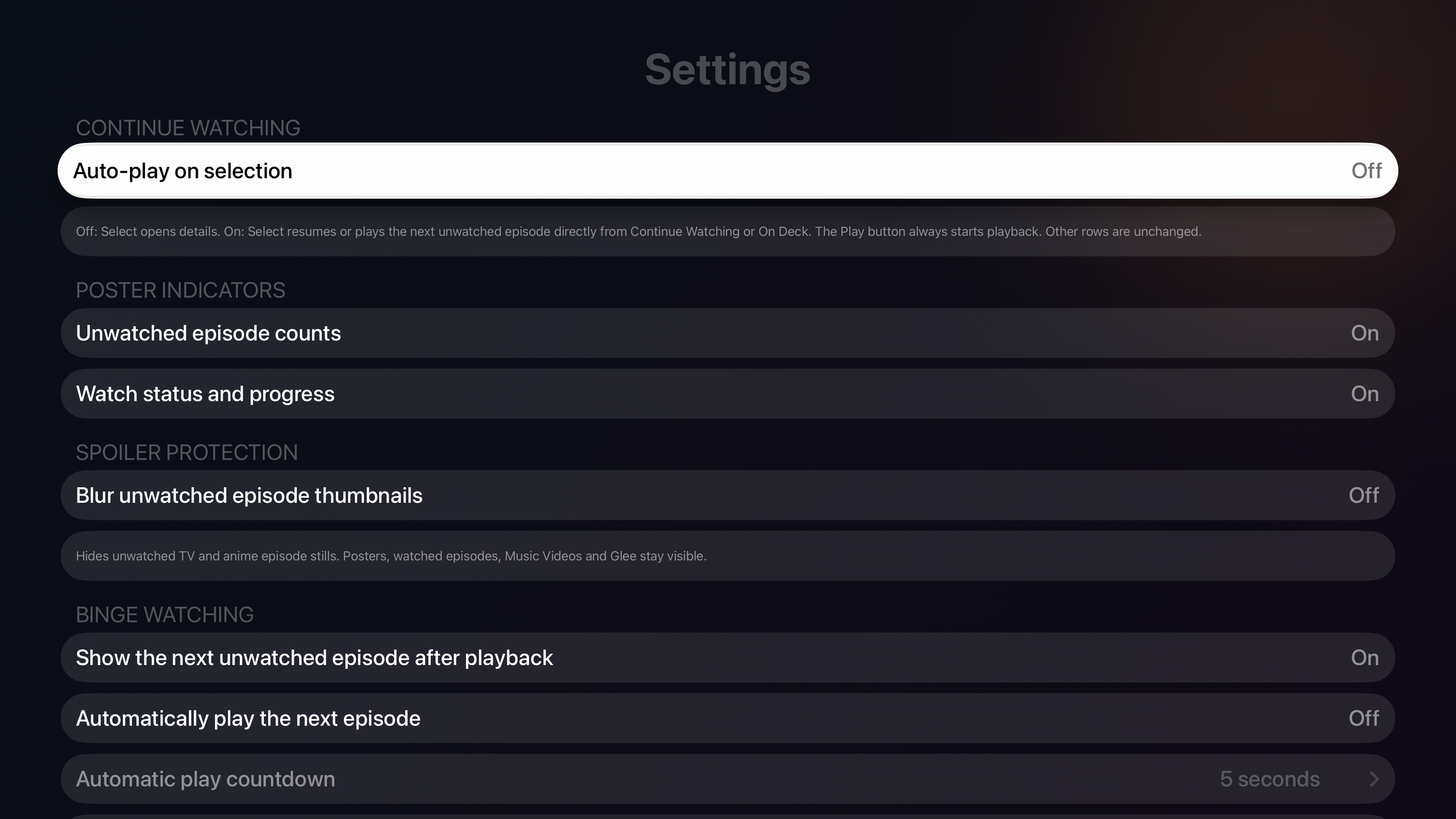
Cinematic Home, configurable poster indicators and spoiler protection are implemented preferences. Intro and credit skipping uses Plex markers when available; marker availability depends on the media and server.
Requirements and first connection
The current project targets Apple TV with tvOS 18 or later. You need a Plex account, access to a Plex Media Server library, and a network route between the Apple TV and the server. PersonalPlex does not include films, television programmes or a hosted library.
- Open the supplied development build and begin Plex account linking.
- Complete the Plex PIN flow using your own account.
- Choose an available server and open a library.
- Start with one known playable item, then check pause, resume and Back with your remote.
Remote access, shared-server permissions and server transcoding capability can affect playback. The tvOS minimum is a build target, not a guarantee that every media format works on every Apple TV.
What is still being refined
Build 50 is the documented physical Apple TV stability baseline. The newer build 51 candidate improves returning to browsing after backgrounding and native playback focus. Its Mac review has passed focused checks; physical Apple TV sleep, HDMI wake, extended playback and audible audio acceptance remain separate.
Creating playlists, adding and removing their entries, and deleting server media are planned management work, not advertised as complete. Broader audio/subtitle selection, compatibility and playback reliability still need validation. A visible development control does not establish that every server operation is ready for release.
Common questions
Does PersonalPlex replace Plex Media Server?
No. It is an Apple TV client for an existing Plex setup. Keep your server running and your account's library access available.
Can it use libraries shared with me?
Shared-server discovery and browsing are implemented. Access still depends on the permissions granted by the server owner and a working connection.
Does it support every video or subtitle format?
No universal compatibility claim is made. Playback depends on the container, codecs, server decisions and Apple TV. Include those details when reporting a problem.
Can I manage and delete my media?
The current focus is browsing, viewing and reliable playback. Complete playlist editing and destructive media deletion are planned work with permission and confirmation requirements.
Is this an official Plex app?
No. PersonalPlex is an independent Cat Pressed Enter project, not affiliated with or endorsed by Plex. No public App Store release is announced.
Questions or feedback?
Tell us what you are trying to do, what happened, or what you would like to see. If you are reporting a problem, include your device and app version.
Visit PersonalPlex support